
Facebook Pixel Not Tracking Conversions: The Complete 2026 Fix

Your processor says 31 sales. Your pixel says 12. Meta optimized on the 12. How to tell a dead pixel from a leaking one, and what server-side events can actually recover.
On this page
- What a facebook pixel not tracking conversions actually means
- Decide which fault you have before you change anything
- Five causes of a facebook pixel not tracking conversions at all
- Why your pixel loses conversions even when it is installed perfectly
- What server-side events recover, and what they do not
- The reporting you need to see any of this
- When the conversion is a Telegram join, the pixel was never in the game
- What fixing your pixel will not do
- The bottom line
- Frequently Asked Questions
Your payment processor says 31 sales this week.
Your pixel says 12.
Now answer the question that costs real money: which of those two numbers did Meta use to decide where your budget went?
The twelve. Always the twelve. Delivery optimizes on the events it receives, so for the last seven days the algorithm has been learning from a third of your results and confidently drawing conclusions about which audience works. Nineteen of your buyers were invisible to it. Some of them came from the ad set you paused on Tuesday for being expensive.
So you do what everybody does. You reinstall the base code. You check for a duplicate pixel. You clear the cache, open the Pixel Helper, fire a test purchase, and it works perfectly · which is the most frustrating possible outcome, because now you have no idea what is wrong.
Here is what makes this so expensive: a Facebook pixel not tracking conversions is usually not broken at all. It is firing exactly as installed and losing events in transit, and no amount of reinstalling fixes a transit problem.
I want to walk you through how to tell those two versions of a facebook pixel not tracking conversions apart in about ten minutes, the five causes of a dead pixel, the four causes of a leaking one, and what you can actually recover.
The short answer: A Facebook pixel not tracking conversions splits into two completely different problems.
Either no events arrive at all · a setup fault, which is binary, rare and fast to find in Events Manager's Test Events tool · or some events arrive and some do not, which is a transit loss caused by ad blockers, browser privacy limits, consent banners and people leaving before the event fires.
The first is fixable in the browser.
The second never is, and the only real remedy is sending the same events from a server through the Conversions API, with an event ID on both copies so Meta does not count them twice.
What a facebook pixel not tracking conversions actually means#
A facebook pixel not tracking conversions is two separate faults producing one identical symptom, and the two need opposite responses.
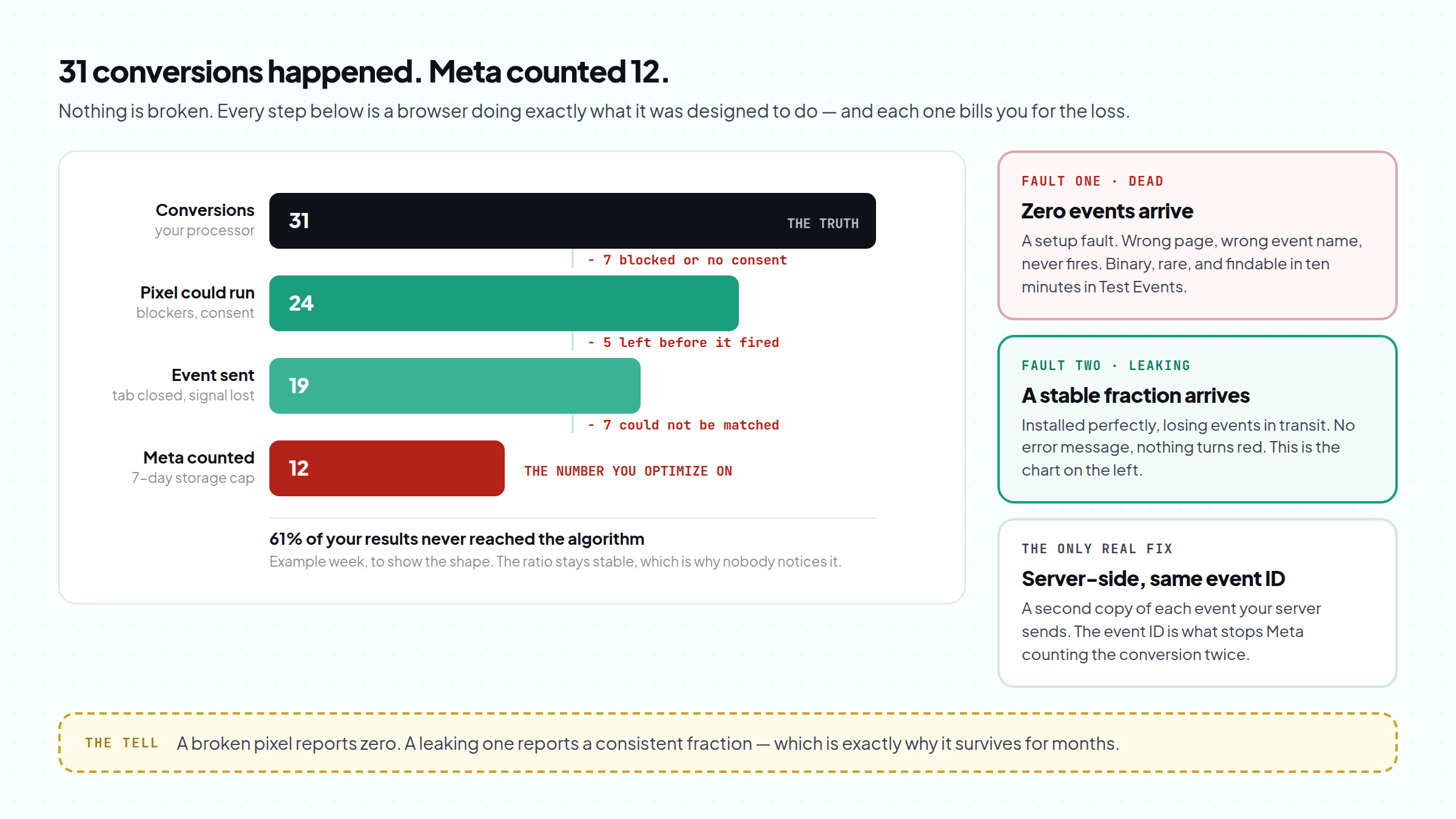
Fault one: nothing arrives. The pixel is missing, misconfigured, blocked at the page level, or firing an event name Meta is not listening for. This is binary. Zero events, not fewer events. It is the less common cause of a facebook pixel not tracking conversions and by far the easier to find, because the evidence is unambiguous.
Fault two: some arrive. The pixel is installed correctly and a predictable share of real conversions never reaches Meta. There is no error message. Nothing turns red. Your numbers are simply lower than reality by a margin you cannot see, every single day, forever · and because the shortfall is roughly proportional, your reports look internally consistent and completely wrong.
Most people spend a week on fault one when they have fault two. That is the whole reason this guide exists.
Decide which fault you have before you change anything#
Ten minutes, in this order. Every hour wasted on a facebook pixel not tracking conversions starts with skipping straight to the fix, so do not.
- Open Events Manager and watch Test Events. Put your page URL in, complete the action yourself, and watch. If the event appears, your pixel is installed and firing · stop looking at the code entirely.
- Compare totals against your own source of truth. Your payment processor, your CRM, your database. Not Ads Manager, which reports attributed conversions and is a different number again.
- Work out the ratio. Twelve against thirty-one is a 61% loss. Twenty-eight against thirty-one is a 10% loss. Those are two different conversations.
- Check one ad set rather than the account. A single broken landing page variant can drag the whole account's reporting down while four of five ad sets are healthy.
In Events Manager Test Events, does your conversion event appear when you complete the action yourself?
Compare your pixel's conversion count with your payment processor or CRM for the same week. How far apart are they?
A setup fault, and the good news is that it is binary and findable. Work through the five causes below in order.
Go to the fixThe pixel is fine. You are firing a custom event while your campaign optimizes for a standard one, or your custom conversion rule never matches.
Go to the fixThis is close to the floor of what browser-only tracking can do. Server-side events will tighten it, but nothing here is broken.
Go to the fixClassic transit loss: blockers, browser privacy limits, consent and early exits. The browser cannot fix this.
Go to the fixThe event fires on your test route and not on the real one. Check mobile, check the variant your ads actually point at, check whether the page is a single-page app.
Go to the fixYour pixel was never going to see it. No pixel runs inside Telegram.
Read that guideSame order as the ten-minute check above: does it fire at all, then how much is missing.
Five causes of a facebook pixel not tracking conversions at all#
If Test Events shows nothing, your facebook pixel not tracking conversions is one of these five. They are in order of how often they turn out to be the answer.
| What is wrong | How you confirm it | The fix |
|---|---|---|
| Event fires on a page your ads never reach | Test the exact URL from the ad, on a phone | Fire the event on the real conversion step, not a thank-you page nobody lands on |
| No event on the step that matters | Test Events shows PageView and nothing else | Add the standard event to the actual action, not just the base code |
| Event name or custom conversion mismatch | Events Manager shows an event your campaign is not optimizing for | Use a standard event name, or fix the custom conversion rule |
| Single-page app never re-fires | The event works on a hard refresh, not on in-app navigation | Fire the event on route change, not on page load |
| Pixel blocked or stripped on the page | Nothing in the browser network tab, nothing in Test Events | Check consent gating, tag manager publish state, and script blockers |
First: reinstalling a pixel that was never the problem.
If Test Events fires, the installation is sound, and reinstalling it will produce a second pixel, duplicate events and a worse report than the one you started with.
Second: trusting Ads Manager's conversion count as the measure of whether your pixel works.
Ads Manager shows attributed conversions inside an attribution window · see Meta's own attribution documentation.
Events Manager shows what arrived.
Those two numbers are supposed to differ, and treating the gap between them as a tracking bug sends you looking for a fault that is not there.
Why your pixel loses conversions even when it is installed perfectly#
This is the version of a facebook pixel not tracking conversions that almost nobody diagnoses, because there is nothing to find. The pixel is a script in a browser, and four things remove it from the path between your buyer and Meta.
Blockers. Content blockers and privacy browsers stop the request before it leaves the device. The conversion happened. The event did not.
Browser privacy limits. Safari and Firefox restrict third-party storage by default, and Safari caps script-written cookies at seven days. A buyer who clicks today and converts in two weeks is frequently a stranger by the time they return.
Consent banners. In the EU and UK a correctly implemented banner means the pixel does not fire until someone accepts. A large share never does, and every one of those is a conversion your browser pixel will never see.
Early exits. People close the tab, lose signal in a lift, or finish the purchase in a payment provider's app. The conversion completes on a server; the browser that was supposed to report it is already gone.
None of those are bugs. They are the designed behavior of the modern web, which means a facebook pixel not tracking conversions reliably is the normal state of browser-only tracking rather than an incident.
- Conversions that happened31
- Browser could run the pixel2477% of the step before · healthy: 85%+
- Event actually sent1979% of the step before
- Matched to a person by Meta1263% of the step before
Example numbers for one week, to show the shape. The third number on the first line is the healthy minimum. Tap "Use my numbers" to put your own week in.
What server-side events recover, and what they do not#
The fix for a facebook pixel not tracking conversions at this stage is not a better snippet. It is a second copy of the same event, sent from somewhere a blocker cannot reach: your server.
Meta's Conversions API accepts events over HTTP from a server rather than a browser. Your server knows the purchase happened · it is the thing that processed it · so it can report the conversion whether or not the buyer's browser cooperated.
Three things make it work, and all three are easy to get wrong:
- An event ID on both copies. Send the same
event_idfrom the browser and the server for one conversion and Meta deduplicates them. Omit it and you will report every conversion twice, which is worse than under-reporting because it looks like success. - Enough matching information. A server event with no identifiers cannot be matched to a person and does little for optimization. Hashed email, a click ID captured on landing, IP and user agent are what lift match quality.
- A token that outlives the account. The Conversions API runs on an access token tied to the portfolio that owns the pixel, which is why where your pixel data lives decides whether any of this survives a restriction.
- ConversionSomeone completes the action · a purchase, a signup, a join.
- Browser eventThe pixel fires with an event ID. Sometimes. This is the copy that goes missing.
- Server eventYour server sends the same event with the same event ID, and cannot be blocked.
- DeduplicationMeta sees two copies of one conversion, matches the event IDs, and counts it once.
- DeliveryThe algorithm now learns from 31 conversions instead of 12, and optimizes toward the audience that actually buys.
The event ID is the whole trick. Without it the two copies become two conversions.
The reporting you need to see any of this#
Here is the uncomfortable part. Everything above assumes you can compare what happened against what arrived, per ad set. Almost nobody can, which is why a facebook pixel not tracking conversions survives for months: the three numbers live in three places that never meet, the conversion is in your database, the event is in Events Manager, and the spend is in Ads Manager.
That is the gap the Plan is built to close: a landing page built, hosted and tracked, reporting visits, CTA taps and conversions per ad set, next to real load times, uptime history, flagged suspicious traffic and blocked pixel events recovered where your Conversions API token allows it. It is $99 a month from your balance, including one tracked Telegram channel, with extra channels at $19 a month.
The ten-minute check at the top of this guide costs nothing and needs none of that. Run it first.
- Gold UK · broad1,240 visits · 26% tapped Join
- Gold UK · lookalike 3%860 visits · 23% tapped Join
- Crypto DE · interests1,510 visits · 6% tapped Join
Sample numbers, not a real account. Your own ad sets show up the same way.
When the conversion is a Telegram join, the pixel was never in the game#
One case deserves its own paragraph, because it produces an identical symptom from a completely different cause.
If your funnel ends in a Telegram channel, no pixel is involved after the click. There is no script inside Telegram and no way to place one. A reported zero is not a facebook pixel not tracking conversions problem at all · it is a structural blind spot, and the only way across it is to route the click through a page you control, issue a join link unique to that visitor, and report the join from a server. That mechanism is in Telegram conversion tracking.
The related symptom, where clicks are billed and visits never appear, is upstream of the pixel entirely and is covered in high CTR, no conversions.
What fixing your pixel will not do#
- It will not improve a bad offer. Fixing a facebook pixel not tracking conversions means you find out faster. It does not change what happens on the page.
- It will not recover the past. Server events start from the day you turn them on. The months you under-reported stay under-reported.
- It will not make your numbers match your processor exactly. Attribution windows, view-through, consent and modeling all sit in between. Closer is the goal; identical is not available.
- It will not protect the account. A restricted ad account stops delivering regardless of how good your measurement is, and that is a different problem.
The bottom line#
A Facebook pixel not tracking conversions is two problems that look the same from the outside, and the expensive mistake is assuming it is the rare one.
If nothing arrives, your facebook pixel not tracking conversions is a setup fault: the event is firing on the wrong page, under the wrong name, or not at all, and ten minutes in Test Events will find it. If some arrive, you have a leak, and no amount of work in the browser will close it, because the browser is where the loss happens. The only real answer there is a second copy of every event sent from your server, with an event ID so Meta counts each conversion once.
Either way, the number that tells you which problem you have is not in Meta. It is in your processor, your CRM, your database · the system that knows what actually happened.
So today, before you touch any code, do this. Take last week. Write down how many conversions really happened, from your own records. Write down what your pixel reported. If the second number is 30% or more below the first, stop reading your Meta reports as fact and start treating them as a sample · because that is what they have been, and every budget decision you made from them was made on a fraction of the picture.
PS. The tell that you are leaking rather than broken is that your pixel's shortfall is stable. Twelve against thirty-one this week, nineteen against forty-eight next week, roughly the same ratio every time. A broken pixel reports zero. A leaking one reports a consistent fraction, which is exactly why it survives for months without anyone noticing.
Frequently Asked Questions
Why is my Facebook pixel not tracking conversions?
How do I know if my pixel is firing correctly?
Why does my pixel show fewer conversions than my payment processor?
Does the Conversions API fix a facebook pixel not tracking conversions properly?
Why does Ads Manager show different conversions from Events Manager?
My conversion is a Telegram join and the pixel reports zero. What do I do?
Keep reading
High CTR No Conversions on Facebook Ads? The Complete 2026 Diagnosis
Your best-CTR ad set produced nothing, so you rewrote the page. If most billed clicks never became visits, non
Virtual Phone Number for Facebook: The Complete 2026 Business Manager Guide
The number that verified your Business Manager belongs to a stranger by spring. What Meta actually checks, why
Facebook Ads Payment Failed? The Complete 2026 Guide to Fixing It Fast
Either your bank refused the charge or Meta did, and the two need opposite responses. How to tell which in thr