Facebook Ads Payment Failed? The Complete 2026 Guide to Fixing It Fast

Either your bank refused the charge or Meta did, and the two need opposite responses. How to tell which in three minutes, and how to stop it pausing delivery again.
On this page
- Why your Facebook ads payment failed: two very different problems
- Read the error before you touch the card
- The bank-side causes of a Facebook ads payment failed notice
- The Meta-side causes, which are about risk rather than money
- The setup that stops a Facebook ads payment failed message costing you delivery
- Where a dedicated ad card helps, and where it does not
- Who this will not help
- The bottom line
- Frequently Asked Questions
You wake up, open Ads Manager out of habit, and everything is paused.
"We couldn't process your payment."
The card works everywhere else. You used it yesterday. So you do what everyone does: you hit retry. Declined. You remove the card and add it again. Declined. You try a different card. Declined again, faster this time.
By the time you have finished, the account has four failed payment attempts on it, your campaigns have been dark for six hours, and the ad set that was finally working has lost its momentum.
Here is what almost nobody realizes in that moment. When your Facebook ads payment failed, one of two completely different things happened, and they need opposite responses. Either your bank said no, or Meta said no. Retrying the same card in a loop is the worst possible move for the second one, because every attempt adds another failure to an account that is already being scored on risk.
Every Facebook ads payment failed message belongs to one of those two families, and the first job is working out which. I want to walk you through how to tell them apart in about three minutes, the fixes that actually work for each, and the billing setup that means a single declined charge never takes your campaigns off air again.
The short answer: A Facebook ads payment failed message has two families of cause.
Bank-side: insufficient funds, a limit, an unconfirmed 3-D Secure prompt, or an issuer blocking a foreign or recurring charge.
Meta-side: a brand-new card on a high budget, a card whose region does not match the account, a card shared across many accounts, or a sudden jump in spend.
Check your account status first, because a restriction can look like a billing problem. Then read the exact error, fix one thing, and retry once.
Never retry the same card repeatedly — each failure is another risk signal on the account.
Why your Facebook ads payment failed: two very different problems#
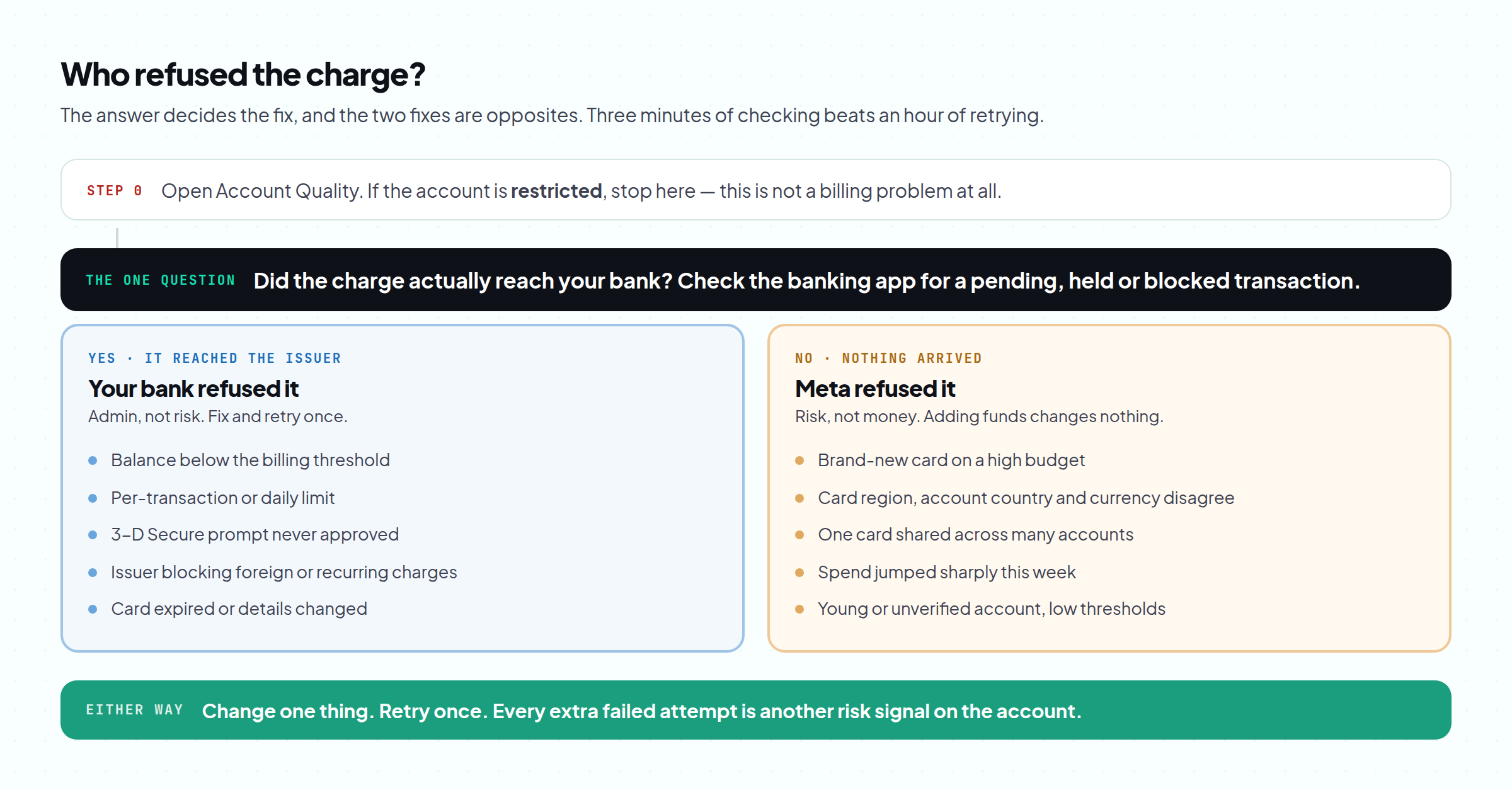
When a Facebook ads payment failed notice appears, the useful first question is not "which card should I try?" It is "who refused the charge?"
Your bank refused it. The charge reached your issuer and the issuer declined. Nothing is wrong with your ad account. This is the more common case and the easier fix.
Meta refused it, or never really tried. The payment method was rejected at Meta's end, or the charge was attempted and the account was flagged around it. This one has nothing to do with your balance, and adding funds will not help.
There is a third possibility that masquerades as both: the account is restricted, not unpaid. Meta does not always make that obvious, and people spend a day fighting with a card when the real problem is an enforcement action. Before touching billing, check whether the account is actually restricted. If it is, the card is not your problem today.
Read the error before you touch the card#
When a Facebook ads payment failed notice lands, three minutes of reading beats an hour of retrying.
- Check account status first. Open Account Quality. If there is a restriction, stop — this is not a billing problem.
- Read the exact wording in Payment settings. "Your card was declined by the bank" and "This payment method can't be used" are different problems with different owners.
- Check your banking app. A held or pending authorization, or a blocked-transaction alert, tells you the charge reached the issuer. If nothing arrived at all, the charge probably never left Meta.
- Check the amount. Compare it against your card limit, your balance and any per-transaction cap. Ad billing charges at a threshold, so the amount is often larger than you expect.
- Then change one thing. One change, one retry. Not four.
The bank-side causes of a Facebook ads payment failed notice#
| What happened | How you recognize it | The fix |
|---|---|---|
| Not enough available balance | Declined the moment a threshold charge lands | Fund the card above the next threshold, not just the current charge |
| Per-transaction or daily limit | Small charges work, larger ones do not | Raise the limit with the issuer, or lower the billing threshold |
| 3-D Secure not completed | A bank prompt you never confirmed | Approve it in the banking app, then retry once. 3-D Secure is an extra approval step, not an error |
| Issuer blocking foreign or online charges | Card works in shops, fails online or abroad | Call the issuer and allow international and recurring charges |
| Card expired or details changed | Worked for months, suddenly stops | Update the card details rather than adding a duplicate |
| Issuer does not allow this merchant type | Fails instantly, every time, from the first attempt | Different card. Some issuers simply block advertising charges |
The Meta-side causes, which are about risk rather than money#
These are the ones that confuse people. The card is funded, it works everywhere else, and the Facebook ads payment failed message keeps coming back.
A brand-new card on a high budget. A card with no history, added to an account that immediately wants to spend heavily, is a pattern Meta's systems treat cautiously. The card is fine. The combination is not.
Region mismatch. When the card's issuing region, the ad account's country and the account's currency do not line up, the charge looks inconsistent. Keep the three in agreement.
One card across many accounts. A single card spread over a stack of ad accounts links them all together and makes each one look less independent. When one has a problem, the connection travels.
A sudden jump in spend. Going from $30 a day to $700 overnight triggers the same review pattern that gets accounts restricted. The payment failure is often the first symptom.
An unverified or very young account. Early thresholds are small and checks are tighter. Nothing is wrong; the account has simply not earned trust yet.
The common thread is consistency. Meta is not asking whether you can pay. It is asking whether this payment looks like the same business that set up the account, and the further those two drift apart, the more often a Facebook ads payment failed message shows up.
Do not "fix" a region mismatch by putting a card in somebody else's name on your account, or by misstating the billing country.
Beyond being an obvious risk signal, giving false billing details is fraud, and it converts a payment problem into a permanent account problem.
If your card's country genuinely does not match the account, the honest fixes are a card issued where the account is registered, or an account registered where you actually are.
The setup that stops a Facebook ads payment failed message costing you delivery#
Everything above is a fix. This is the prevention, and it takes one afternoon.
- Keep a verified backup payment method on every ad account. Meta can fall back to it instead of pausing you at 3am.
- One card per ad account where you can. It keeps accounts independent and stops one decline cascading.
- Keep a funded buffer above your next billing threshold, not your current spend. Thresholds rise as you spend more, so the charge that fails is usually bigger than the last one that worked.
- Raise budgets in steps. The spend jump that trips billing is the same one that trips review. This is the same discipline that keeps accounts alive, covered in why ad accounts keep getting banned.
- Fix the ownership of your assets while nothing is broken — the pixel especially, since a billing pause is a good reminder that your data should not live inside the account that can die.
Where a dedicated ad card helps, and where it does not#
If you are running grey-vertical offers, the boring version of this problem is that your regular bank is simply not keen on funding them, and you find out at the worst moment.
A card issued for ad spend solves a specific set of the problems above: you can fund it above the next threshold, it is not doing anything else that might trip your bank's fraud rules, and it belongs to one account rather than being shared across five. The virtual cards on the TradingFellows stack are set up that way — ten percent on what you load, a two hundred dollar minimum load, and attached to the account they bill.
Be clear about what that does not do, because it matters:
- It does not stop a restriction. If the account is restricted, no card revives it. That is a different problem with a different fix.
- It does not make a young account spend like an old one. Thresholds still start small.
- It does not survive a sudden budget jump. Raise spend in steps whatever you pay with.
- It is not a way around a region mismatch you should fix properly.
Who this will not help#
- If your account is restricted, this whole article is the wrong one. A Facebook ads payment failed message is sometimes just how a restriction shows up. Deal with the restriction first.
- If every card you own fails instantly on a fresh account, the account is the problem, not the payment method. Start with what makes a Business Manager last.
- If you have already retried six times today, stop. Give it a day. Each failure adds to the pattern, and today is not going to be the day it goes through.
The bottom line#
A Facebook ads payment failed message is a question about who refused the charge, and you cannot fix it until you know the answer. Your bank refusing is admin: fund it, approve the 3-D Secure prompt, allow international charges, retry once. Meta refusing is a risk signal: the card is too new, too shared, too far from the account's region, or the budget moved too fast.
The pattern that costs the most is the same one everybody falls into — retrying the same card over and over while the campaigns sit dark, adding another failure to the account each time.
So do this before you touch anything else. Open Account Quality and rule out a restriction. Read the exact error text. Check your banking app for a pending approval. Then change one thing and retry once. And while nothing is on fire this week, add a verified backup payment method to every account you run, because the cheapest version of this problem is the one that never pauses delivery in the first place.
PS. Fund the card against your next billing threshold, not your last charge. Thresholds climb as the account spends, so the payment most likely to fail is the one right after your best week — which is exactly when you can least afford to be dark.
Frequently Asked Questions
Why does Facebook say my payment failed when my card has money on it?
How many times should I retry when a Facebook ads payment failed?
Can I use a virtual or prepaid card for Facebook ads?
Will my campaigns restart automatically after I fix the payment?
Why did my payment fail right after I increased the budget?
Does a failed payment get my ad account banned?
Keep reading
Virtual Phone Number for Facebook: The Complete 2026 Business Manager Guide
The number that verified your Business Manager belongs to a stranger by spring. What Meta actually c
Transfer Facebook Pixel to Another Business Manager: The Complete 2026 Guide
The account died. The pixel did not, unless it lived in the same place. Where pixel data actually li
Facebook Ad Account Restricted? The Complete 2026 Guide to Getting Back Live
The banner says restricted. It does not say which of four levels was hit, and each one has a differe