Transfer Facebook Pixel to Another Business Manager: The Complete 2026 Guide

The account died. The pixel did not, unless it lived in the same place. Where pixel data actually lives, how to share it in five minutes, and the setup that keeps it yours.
On this page
- Can you transfer Facebook pixel ownership to another Business Manager?
- Where your pixel data actually lives
- What survives each kind of restriction
- How to transfer Facebook pixel access to another business portfolio
- The setup that makes the next restriction cheap
- Conversions API: the part that makes the data yours
- What the pixel will not save you from
- The bottom line
- Frequently Asked Questions
The ad account died on Thursday. You already had a replacement lined up, so by Friday lunchtime you were back in Ads Manager, building the campaign again.
Then you got to the conversion event dropdown and your stomach dropped.
Seven months of purchases. Every lead, every checkout, every lookalike you built on top of them. All of it sitting in a pixel that belongs to a business portfolio you can no longer get into.
So you search for how to transfer a Facebook pixel, you find a Quora thread from 2019 and a YouTube video with the wrong menu names, and you start wondering whether you are about to launch the new account completely blind.
Here is the thing nobody tells you until it is too late. In most cases the data is not gone. It never lived in the ad account in the first place. Whether you can reach it tonight was decided months ago, by where you put the pixel when you created it.
I want to walk you through where your pixel data actually lives, what survives each kind of restriction, how to transfer Facebook pixel access into a new account in about five minutes, and the setup that means the next restriction costs you an ad account and nothing else.
The short answer: You cannot transfer Facebook pixel ownership with a button.
A pixel — Meta now calls it a dataset — belongs to the business portfolio that created it, and that never changes on its own.
What you can do is share it: assign it to another ad account in the same portfolio, or add another portfolio as a partner.
Sharing is instant, reversible and keeps the same pixel ID and its full history. An ad account restriction almost never costs you pixel data.
A restriction on the portfolio that owns the pixel is what locks you out, which is why the pixel should live in a portfolio you never run risky ads from.
Can you transfer Facebook pixel ownership to another Business Manager?#
Not in the way most people mean it. There is no self-serve option to transfer Facebook pixel ownership from one business portfolio to another. Ownership stays with whichever portfolio created the pixel. What used to be called Business Manager is now the business portfolio, and in Events Manager the pixel sits inside a dataset, but the rule underneath has not changed.
What Meta gives you instead is sharing, and for almost every real situation it does the job better than a transfer would:
Assigning to an ad account. Any ad account inside the owning portfolio can be given access to the pixel. That is the normal case — one portfolio, several ad accounts, one pixel shared between them.
Adding a partner portfolio. The owning portfolio can give a different portfolio access to the pixel. The partner can then assign it to its own ad accounts. The pixel ID stays the same, the code on your site does not change, and the event history comes with it.
There is also a slower route where Meta support moves ownership between portfolios. Some people report it working. It takes days, it has to be requested from the portfolio that currently owns the pixel, and it is not something to plan an outage around. If you are trying to transfer Facebook pixel access at midnight with a dead account, sharing is the tool.
Where your pixel data actually lives#
This is the part that decides everything, so it is worth getting exactly right.
Your pixel data belongs to the pixel. Not the ad account, not the campaign, not the ads. The ad account is just something that has been given permission to read from it and optimize against it.
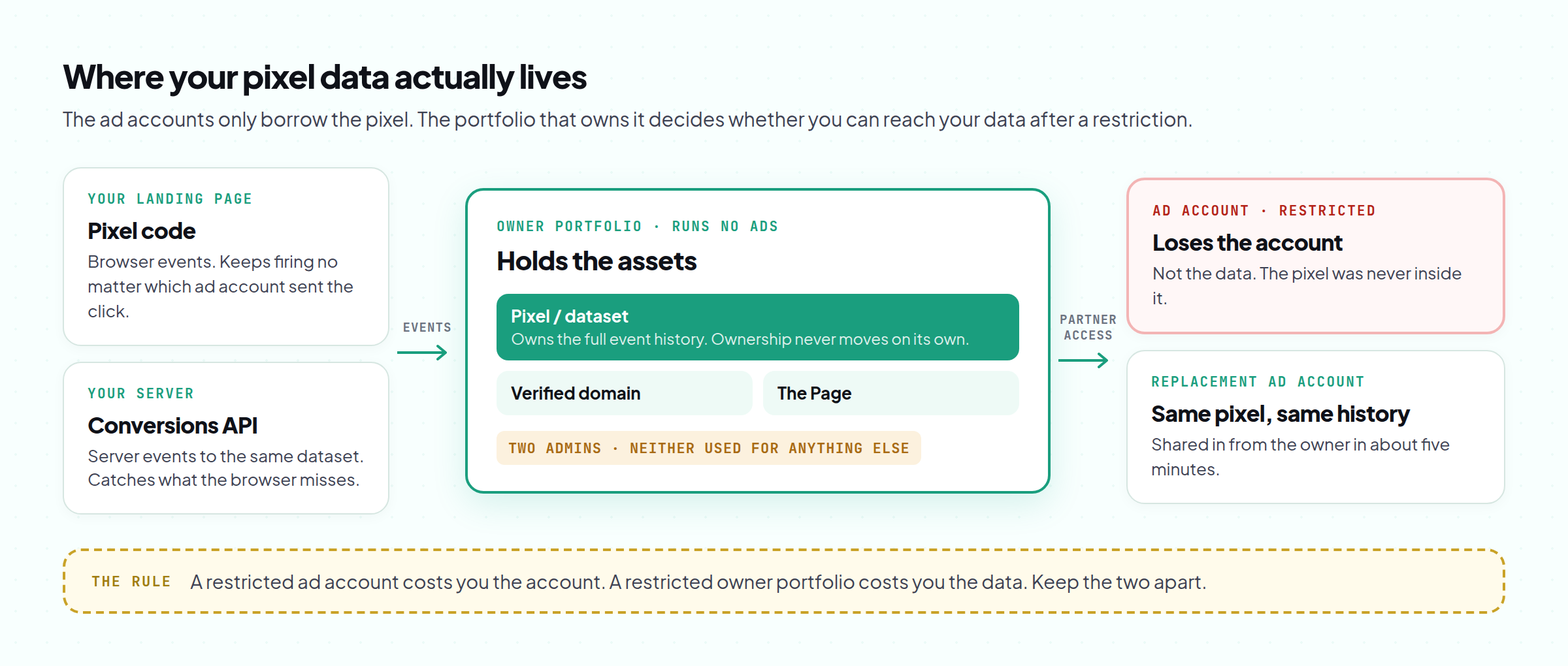
So when an ad account dies, the pixel does not die with it. The pixel keeps collecting events from your site the whole time, because the code on your landing page does not know or care which ad account is sending the traffic. Point a new ad account at the same pixel and it has everything the old one had.
The one thing that can separate you from the pixel is losing access to the portfolio that owns it. If that portfolio is restricted, or if the only admin on it was a profile that is now restricted from advertising, the pixel is still out there collecting data — you just cannot assign it to anything new.
That is why people who try to transfer Facebook pixel access after a portfolio restriction usually discover they are too late. The time to decide who owns the pixel is before anything goes wrong.
What survives each kind of restriction#
Before you try to transfer Facebook pixel access anywhere, find your row.
| What got restricted | Your pixel data | Can you point a new ad account at it? | Audiences built on it |
|---|---|---|---|
| One ad account | Untouched | Yes, from the same portfolio, in minutes | Rebuild or share them into the new account |
| The portfolio that owns the pixel | Still collecting | Only if that portfolio can still share it. Often not | Stuck with the portfolio until the review is settled |
| A different portfolio that only had partner access | Untouched | Yes — the owner shares it to a healthy portfolio | Rebuild in the new account |
| Your personal profile | Still collecting | Only through another admin on the owning portfolio | Depends on who else can act for the portfolio |
The last row is the quiet one that catches solo operators. If you are the only admin on the portfolio that owns the pixel, a restriction on your profile leaves nobody who can share it. A second trusted admin is not bureaucracy. It is insurance.
How to transfer Facebook pixel access to another business portfolio#
If the portfolio that owns the pixel is healthy, this is how you transfer Facebook pixel access to a new ad account or portfolio in about five minutes.
- Find the new portfolio's ID. In the portfolio that needs access, open Business settings and copy the business portfolio ID.
- Open the owning portfolio. Business settings, then Data sources, then Datasets (older menus still say Pixels). Select the pixel.
- Assign the partner. Choose the option to assign partners, paste the portfolio ID, and choose the access level — full control for your own portfolios, analysis-only for anyone who only needs to see results.
- Assign it to the ad account. Inside the partner portfolio, the pixel now appears under data sources. Assign it to the new ad account.
- Check the events are flowing. Open Events Manager from the new ad account and confirm recent events are showing. Then check each custom conversion and audience size rather than assuming they came across intact.
The same sharing works for assigning the pixel to a replacement ad account within one portfolio: skip steps one and three.
If the account was restricted because of your ads, your landing page or your domain, sharing the same pixel into a new account does not reset anything.
Meta can see which assets are connected, and the pixel, the domain and the offer carry their history with them.
Rebuilding the same setup around the same assets after a policy restriction is what Meta calls circumventing its systems. Fix what caused the restriction first.
The pixel is there to keep your data, not to hide where it came from.
The setup that makes the next restriction cheap#
Here is how teams that once had to transfer Facebook pixel access in a panic set things up the second time. It is also how Meta expects a brand and its agency to work, so there is nothing clever about it.
One portfolio owns the assets. The pixel, the verified domain, the Conversions API connection, the Page. This portfolio exists to hold things. It does not run ads, so it carries none of the day-to-day risk that ad accounts carry.
Other portfolios run the ads. They get partner access to the pixel and nothing more. When an ad account dies, you replace the ad account. When one of these portfolios is restricted, the owner removes it as a partner and shares the pixel with a healthy one.
At least two admins on the owner. Two trusted people, both on profiles that are not used for anything else. If one is restricted, the other can still act.
The payoff is simple. With this structure, a restriction costs you an ad account and a couple of hours. Without it, a restriction can cost you the whole measurement history the account was optimizing against — and the lookalikes, and the retargeting pools, and the months it took to build them.
This is what the TradingFellows homepage means by "the pixel keeps compounding." The accounts come and go. The data underneath them should not. When you need the replacement account itself, the stack shows live stock and delivers into your Hub in minutes, and the landing page product is built and hosted on your domain, so the domain your pixel reports on stays yours as well.
If you are building the replacement setup from scratch, the Business Manager guide covers which account tier suits which job. The account-level side of the same problem is in what to do when your Facebook ad account is restricted, and the portfolio-level version is in what to do when a Business Manager is banned.
Conversions API: the part that makes the data yours#
The browser pixel is only half of the picture. The other half is the Conversions API, which sends events from your server straight to the same dataset.
Two reasons it matters here.
First, it catches events the browser pixel misses — blocked scripts, privacy settings, people who leave before the page finishes loading. More complete data means a new ad account has more to optimize against from day one.
Second, the connection runs from infrastructure you control to a dataset you own. The ad account is not part of that pipe at all. If you ever do need to transfer Facebook pixel ownership through Meta support, you regenerate the access token and the events keep arriving.
If you set the Conversions API up inside a portfolio that runs ads, it inherits the same risk as the pixel. Set it up in the portfolio that owns the assets.
What the pixel will not save you from#
A pixel is data, not a force field. So, plainly:
- It will not carry the learning phase. The new ad account and its campaigns still start learning from scratch. The pixel history gives delivery something to work with, which is better than starting blind, but you should still relaunch at the budget you were on before the increase that got the last account reviewed.
- It will not fix the reason for the restriction. If the ads or the page were the problem, the problem comes with them. The usual culprits are in why your ad account keeps getting banned.
- It will not rescue a pixel you never controlled. If an agency, a freelancer or a seller created the pixel in their portfolio, you only ever had access. You cannot transfer Facebook pixel ownership away from them yourself, so ask them to share it to a portfolio you own now, while everyone is still answering messages.
- It will not undo a restriction on your profile. If you were the only admin on the owning portfolio, the data is still collecting, but nobody can share it until that review is settled.
The bottom line#
When people search how to transfer Facebook pixel data after a ban, they are usually asking the question too late. The data was never in the ad account. It lives in the pixel, the pixel belongs to a portfolio, and whether you can reach it after a restriction depends entirely on which portfolio that is.
Put the pixel in a portfolio that never runs ads, give it two admins, feed it with the Conversions API, and share it into whatever ad accounts you are running. Do that, and a restriction costs you an ad account and an afternoon. Skip it, and a restriction can cost you the measurement history that made the campaign worth running.
So do this today, before anything is on fire. Open Business settings, go to Data sources, and find out which portfolio actually owns your pixel. If the answer is "the same one I run ads from" or "I'm not sure", move the rest of your setup around it this week, while sharing is still a five-minute job and not a support ticket.
PS. Check the owner line, not the access list. Half the people who think they own their pixel only have partner access to one sitting in an old agency's portfolio. If that is you, the only time to fix it is while the agency still answers your messages.
Frequently Asked Questions
Can I transfer a Facebook pixel to another Business Manager?
Do I lose my pixel data if my ad account is disabled?
Does a shared pixel keep its history?
Can I use the same pixel on multiple ad accounts?
Will sharing my old pixel get my new ad account restricted?
What is the difference between the Meta pixel and the Conversions API?
Keep reading
Facebook Ad Account Restricted? The Complete 2026 Guide to Getting Back Live
The banner says restricted. It does not say which of four levels was hit, and each one has a differe
Forex Content Marketing: The Complete Strategy for Brokers and Prop Firms in 2026
Your forex broker spends $15,000/month on Facebook ads. Every time an ad account gets banned, you lo
Facebook Ads for Supplements: The Complete Guide to Running Nutra Without Losing the Account in 2026
Your supplement ad got rejected....