
Telegram Conversion Tracking for Meta Ads: The Complete 2026 Guide

Ads Manager stops watching at the click, so you scale the ad set with cheap clicks instead of the one bringing members. How a join gets matched back to its ad set.
On this page
- What telegram conversion tracking actually means
- Why Meta optimizes toward the wrong people without telegram conversion tracking
- Three ways people try telegram conversion tracking, and what each misses
- Joins are the wrong number on their own
- Sending the join back to Meta
- What this will not do
- What it costs, and what you get
- The bottom line
- Frequently Asked Questions
You spent four thousand dollars this month sending Meta traffic to a Telegram channel.
Ads Manager is pleased with itself. Ad set three has the best cost per link click by a distance, so that is where the budget went. Ad set one looks expensive and you turned it off two weeks ago.
The channel gained 210 members.
Now answer the only question that matters: which ad set brought them?
You cannot. Nobody can, from Ads Manager. Meta stopped watching at the click. Everything after that happened inside a different app, and the report you have been optimizing against for a month has no idea whether a single one of those clicks became a member who stayed.
There is a decent chance the ad set you turned off was the one bringing real people, and the cheap one you scaled is bringing the kind of clicker who never joins anything.
This is the gap telegram conversion tracking exists to close. I want to walk you through exactly where the measurement breaks, the three ways people try to patch it and what each one still misses, and how a join gets matched back to the ad set that caused it.
The short answer: Telegram conversion tracking is the practice of matching a Telegram join back to the exact Meta ad set that produced it, and sending that join back to Meta as a conversion.
It is needed because Meta's pixel cannot run inside Telegram, so by default Meta optimizes toward clicks rather than members.
The workable method is a per-visitor deep link issued on a landing page you control: the ad's URL parameters identify the ad set, the page mints a unique join link, and a bot in the channel reports the join against it.
Channel analytics and one promo link per campaign cannot do this, and a join through your public @username cannot be attributed at all.
What telegram conversion tracking actually means#
Telegram conversion tracking means closing a specific gap: the moment someone leaves your ad and enters an app where your pixel does not exist.
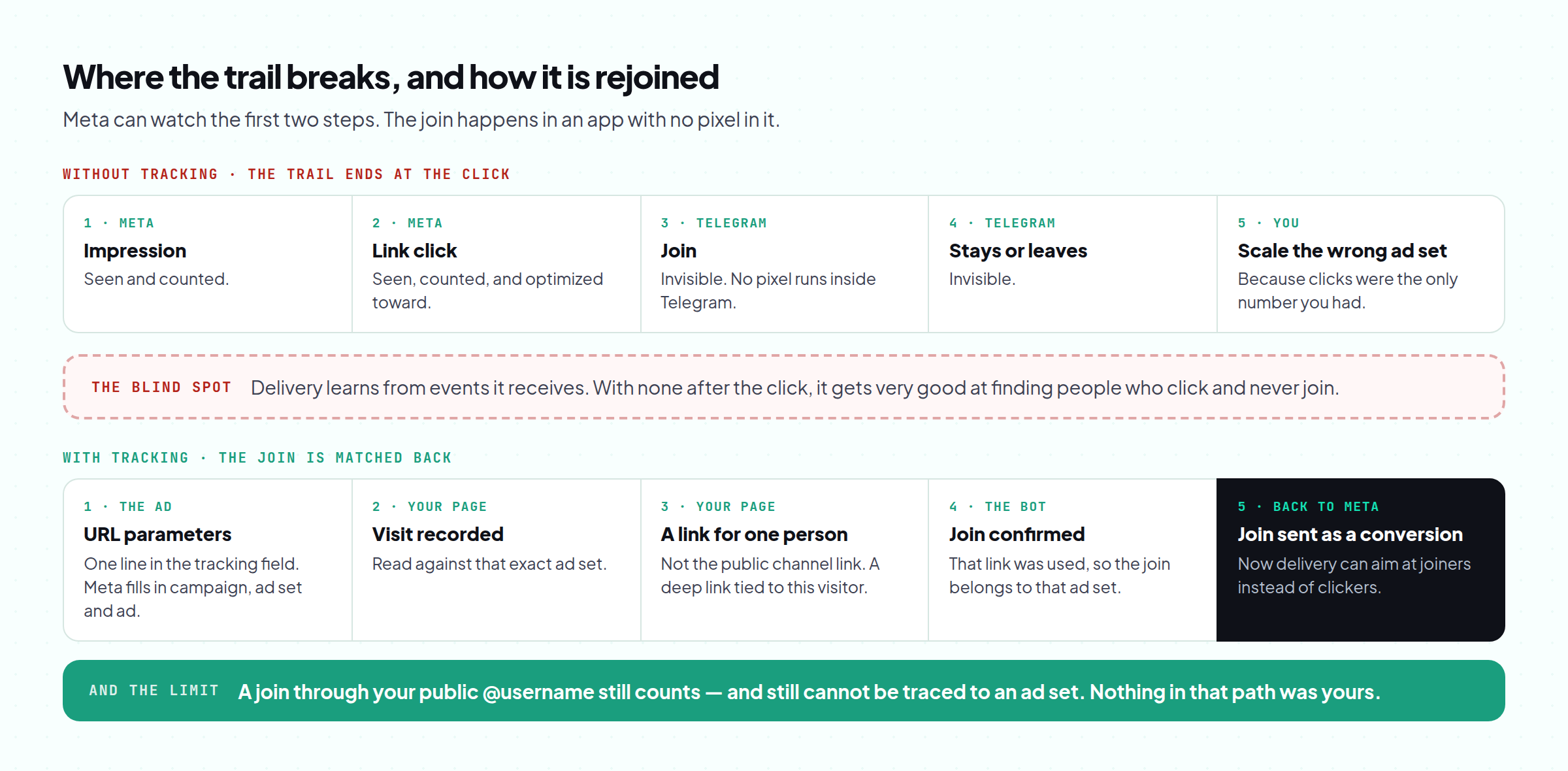
Meta can see the impression, the click, and · if you send people through a landing page · the page view. Then the trail stops. Telegram is not a website. There is no pixel inside a channel, no script to place, no way for Meta to observe what happens next.
So Meta does the only thing it can. It optimizes for what it can measure. Tell it to get link clicks and it will get very good at finding people who click links. Those are not the same people as the ones who join a channel and read it three weeks later, and the gap between the two is where most of the budget in this niche disappears.
That is the whole problem, and every telegram conversion tracking method below is an attempt to solve it.
Why Meta optimizes toward the wrong people without telegram conversion tracking#
Worth being precise here, because it explains why this is not a reporting inconvenience but a budget problem.
Meta's delivery system learns from the conversion events it receives. No events, no learning · it falls back to the cheapest version of the objective you gave it. Optimize for link clicks in a grey vertical and delivery drifts toward the cheapest clickers available, which tends to mean the least considered audience on the platform.
You then read the report, see a low cost per click on that ad set, and scale it. The system did what you asked. You asked the wrong thing, because the right thing was invisible.
This compounds. Every day you optimize on clicks is another day the algorithm learns a profile of person who is cheap to reach and unlikely to join. By the time the channel numbers look wrong, weeks of learning point in the wrong direction.
Three ways people try telegram conversion tracking, and what each misses#
| Method | What it tells you | What it misses |
|---|---|---|
| Telegram channel analytics | Total members, joins and leaves over time | Nothing about source. A good day and a bad ad set look identical |
| One invite link per campaign | Roughly which campaign drove joins | Ad set and ad are invisible, which is the level you actually optimize at |
| Public @username in the ad | Simplicity | No attribution at all. The join is real and completely anonymous |
| A per-visitor deep link from a tracked page | Which ad set, ad and creative produced each join | Requires the click to pass through a page you control |
Here is the sequence that makes telegram conversion tracking work, end to end:
- The ad carries URL parameters. One line pasted into the ad's tracking field. Meta fills in the campaign, ad set and ad automatically.
- The visitor lands on a page you control. The page reads those parameters and records the visit against that ad set.
- The page mints a join link unique to that visitor. Not your public channel link · a one-time deep link tied to this session.
- A bot in the channel reports the join. When that specific link is used, the bot sees the join and it is matched to the ad set from step one.
- The join is sent back to Meta as a conversion. Now the delivery system has a real event to learn from, and can optimize toward joiners instead of clickers.
A join through your channel's public @username is counted but cannot be traced to an ad set · the join is real, the source is genuinely unknowable.
Anyone claiming to attribute those is guessing.
The same applies to word of mouth, forwards and screenshots: they will show in your member count and never in your ad report.
Judge ad sets on attributed joins, and treat the gap between attributed and total as the organic and unknown layer rather than pretending it is zero.
Joins are the wrong number on their own#
Here is the mistake that survives even after telegram conversion tracking is working: treating a join as the finish line.
In this niche, a meaningful share of joiners leave within hours. Some were never interested, some were farmed, and some joined for one pinned post. An ad set that delivers 100 joins where 60 leave by Wednesday is worse than one delivering 55 joins that stay, and on a joins-only report the first one wins and gets scaled.
So the number that matters is joins that stay, and the useful cut is early. If you can see how fast joiners from each ad set leave, you get a verdict in about two days instead of waiting a week for the member count to settle. That is the difference between killing a bad ad set on Tuesday and killing it the following Monday, with five more days of spend behind it.
One honest caveat on the measurement: a bot can only report on what happens after it joins the channel. Members who leave from before it was added are invisible to it, and any tool that counts those as churn from your ads is mixing two different things.
Sending the join back to Meta#
Attribution answers your question. Sending the event back answers Meta's.
Once a join is matched to an ad set, that join can be reported to your pixel as a conversion through the Conversions API, which accepts events from a server rather than a browser. From delivery's point of view, your funnel now has a conversion where it previously had a dead end, and optimization has something real to aim at.
This is the same infrastructure that recovers browser events blocked by ad blockers and privacy settings, which is worth doing anyway · and it depends on the pixel and the Conversions API token living somewhere you will still control after a restriction. That is covered in where your pixel data actually lives.
Two practical limits. Sending events needs your Conversions API token, so this is a setup step rather than a switch. And if Telegram throttles link creation during a sudden spike, the join button falls back to your normal link · the join still counts, it just is not attributed for that visitor.
What this will not do#
- It will not attribute joins you did not send through a page. Straight-to-Telegram ads and @username joins stay anonymous. That is a property of the platform, not a product gap.
- It will not make a bad offer work. Telegram conversion tracking measures the funnel; it does not improve the offer inside it. Knowing precisely which ad set brings people who leave is useful and still not a fix for the reason they leave.
- It will not survive a dead ad account. Measurement does not protect the account it measures · that is a separate problem.
- It will not label bots for you with certainty. Traffic can be flagged as suspicious, and a real person on a work VPN can land in that bucket while a careful bot on a phone network avoids it. It is a signal to investigate, not a verdict.
What it costs, and what you get#
TradingFellows runs this as the Plan: a landing page built, hosted and tracked, plus one Telegram channel tracked, for $99 a month from your balance. Extra channels are $19 a month each. What you look at is per ad set: visits, CTA taps and joins, how fast joiners leave, real load times and uptime, flagged suspicious traffic, and blocked pixel events recovered where your Conversions API token allows it.
The vertical version of this funnel, for the audience that runs it most, is in Telegram ads for forex, and the policy side of running these offers on Meta is in advertising crypto on Facebook.
The bottom line#
Telegram conversion tracking exists because Meta's measurement stops at the edge of your ad and your funnel continues in another app. Until the join comes back, you are not optimizing your campaign. You are optimizing the part of it Meta happens to be able to see, which is the click.
The fix is not clever, it is structural: route the click through a page you control, issue a link unique to that visitor, let a bot confirm the join, and send the join back as a conversion.
So do this before your next budget decision. Take your last thirty days, write down which ad set you scaled and which you paused, then ask yourself what evidence you had that the scaled one brought members rather than clicks. If the honest answer is "the cost per click looked good", you have been running on the wrong number · and the cheapest month to fix it is the one before you scale again.
PS. The tell is a channel that grows far slower than your click volume suggests it should, with no obvious culprit. That gap is almost never one bad creative. It is usually one ad set quietly buying clickers, sitting at the top of your report because clicks are the only thing the report can count.
Frequently Asked Questions
Can you track Telegram joins from Facebook ads?
Why does Meta optimize badly for Telegram funnels?
Do I need a landing page for telegram conversion tracking?
How soon can telegram conversion tracking judge an ad set?
Will old members leaving distort telegram conversion tracking numbers?
What does Telegram conversion tracking cost?
Keep reading
Telegram Invite Link Tracking: How to Track Every Ad Set in 2026, Step by Step
How to give every ad set its own Telegram invite link, what Telegram counts for free, and how to track who is
Forex Signals Telegram Channel: How to Run Ads That Pass Review (2026)
What each platform allows for a forex signals Telegram channel, how to write ads that pass review, and how to
Cost per FTD: What It Is, How to Calculate It and How to Lower It (2026)
What cost per FTD means, how to calculate it per ad set with a free calculator, why it beats cost per lead, an