
Meta can’t see who joins your Telegram. Now it can.
Count every join per ad set, see how fast joiners leave and how many are still in after 7 days, and send each landing-page join back to your pixel as a server event. Built into the Hub, next to the accounts you run the ads on.
The blind spot
Most FX, crypto and signal funnels end in a Telegram channel. The ad sends people to a landing page, the landing page sends them to t.me, and that’s where Meta goes blind. It saw a click. It never sees the join.
So the campaign optimises for the only thing Meta can measure: clicks. Cheap clicks from people who never join, or who join and leave by Friday. You find out when the channel doesn’t grow, and by then the budget is spent.
How it works
- Link your TelegramOpen Channels in the Hub and tap Start in the bot, so it knows the channel is yours.
- Add the bot as an adminIt needs one right: Invite users via link. It never posts, never messages your members and never reads your chat.
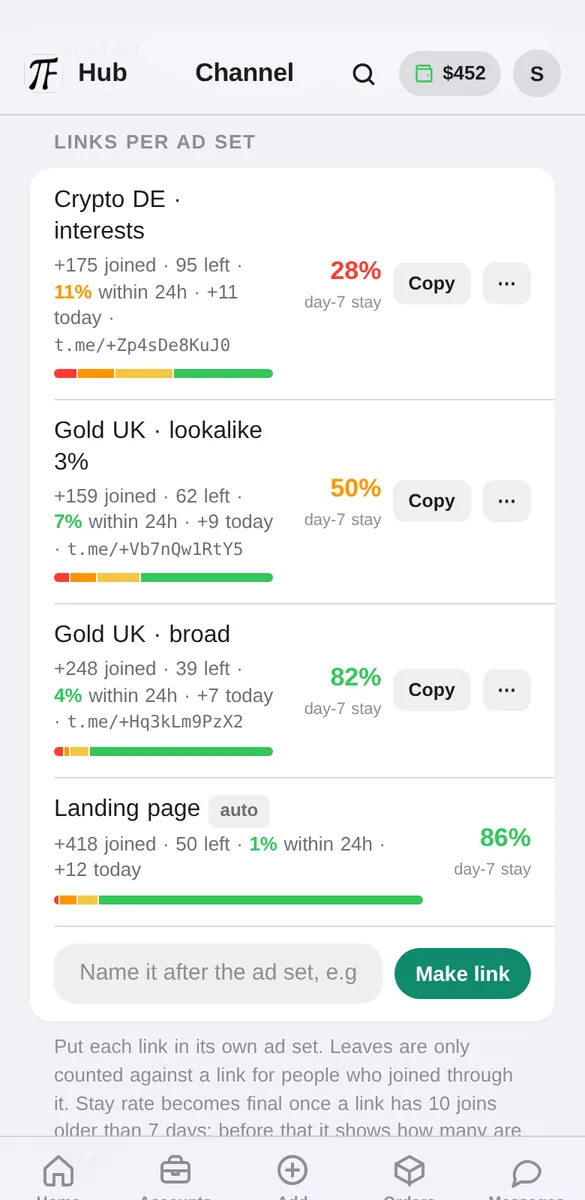
- Make one link per ad setName it after the ad set and paste it into the ad. Every join through it is counted against that ad set, and so is every leave.
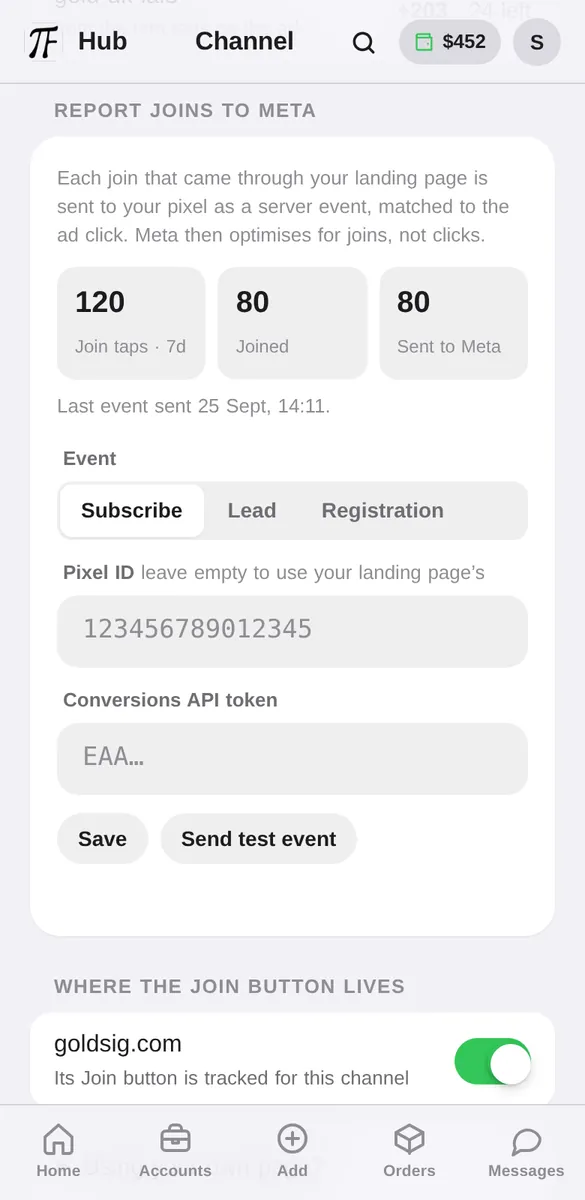
- Let your landing page report joinsYour Join button stays a normal t.me link. At the tap it becomes a one-time link tied to that visitor’s ad click, and when they join, the join goes to your pixel through the Conversions API.
What you actually
get to look at.
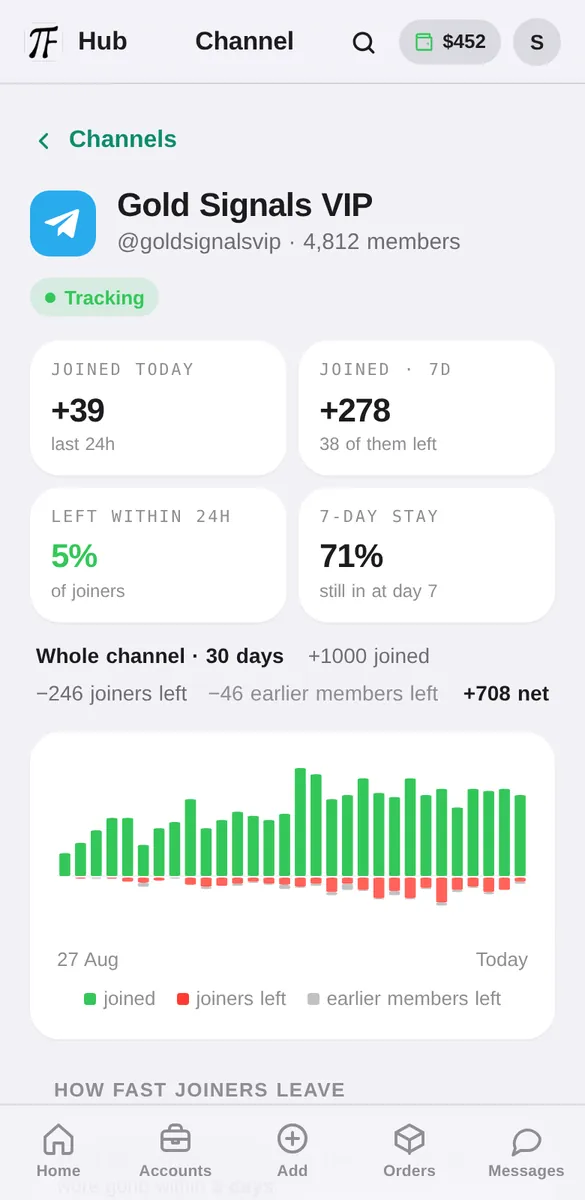
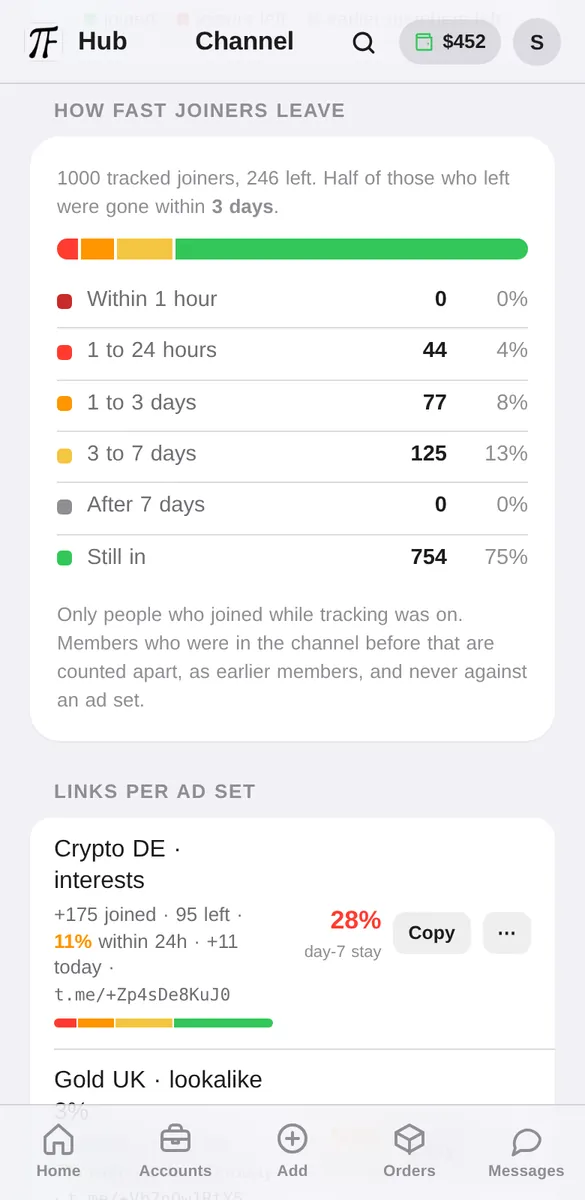
Real screens from Channels in the Hub, on sample data.
Old members leaving won’t look like fake joiners
A channel with history always has people drifting out. Put that next to today’s joins and it reads like the ads bring fake members: ten joined, fifteen left. Most of those fifteen were never yours to judge. They joined months before the ad ran.
Looks like the ad set brings people who leave the same day.
Only people who joined through a link are ever counted against that link.
Anyone who was in the channel before tracking started is an earlier member. Their leaves show in grey on the chart and in the whole-channel total, so the member count always adds up, but they never touch an ad set’s numbers.
The verdict on day 2, not day 8
The 7-day stay rate is the final word on an ad set, but it takes a week. The share of its joiners who leave within 24 hours is readable the next morning, and it usually points the same way.
When a big share of an ad set’s joiners leave within the hour, the ad promised something the channel doesn’t give, or the traffic isn’t real. Either way you know on day 2, before another week of budget goes into it.
What you see
What goes to Meta
Only joins from your landing page, because only those carry the ad click to match against. Each one is a single server event:
What we keep, and for how long
Telegram member IDs are stored hashed, never in the clear. A visitor’s IP address is kept only until their event is sent, 48 hours at most. Each one-time link is revoked the moment it has been used, so it can’t be passed around.
The limits, plainly
Joins through your channel’s public @username are counted, but can’t be traced to an ad set. The Meta reporting needs your Join button on a page that loads our script: on a page we host that’s one switch, on your own it’s one line. And if Telegram ever slows down link creation during a sudden spike, the button falls back to your normal link. The join still counts; it just isn’t sent to Meta. Earlier members leaving are counted from the moment the bot is added: anything before that is invisible to Telegram bots.
Questions
Will old members leaving make my new joiners look fake?
No. Anyone who was in the channel before tracking started is counted apart, as an earlier member. Their leaves show in grey and in the whole-channel total, never against an ad set.
How soon can I judge an ad set?
The next day. The share of its joiners who left within 24 hours is readable after one day, and the 7-day stay confirms it after a week.
Does the bot post or message my members?
No. It never posts, never messages your members and never reads your chat. It only sees who joins and leaves, and makes invite links when you ask for one.
What permissions does it need?
One admin right: Invite users via link. Switch everything else off.
Does it work with groups?
Yes. Channels and supergroups both work, public or private.
Which Meta event is sent?
Subscribe by default. You can switch a channel to Lead or CompleteRegistration in the Hub.
Do I need a landing page from you?
No. On a page we host it is one switch. On your own page it is one line of script, and your Join button stays a normal t.me link.
What does it cost?
It is part of the Hub. If a channel ever carries a monthly fee, you see it in the Hub before anything is charged, and it is paid from your balance.
Find the ad set
that brings people who stay.
Two taps in Telegram, then it runs by itself.