
How to Run Forex Ads in 2026: Meta, Google, Telegram and TikTok, Step by Step

A step by step guide to running forex ads in 2026: what each platform allows by country, how affiliates and IBs stay inside the rules, what to write, and how to judge results.
On this page
- What are forex ads?
- Where can you run forex ads in 2026?
- Meta: Facebook and Instagram
- Google Ads
- Telegram Ads
- TikTok
- How to run forex ads, step by step
- How to run forex ads as an affiliate or IB
- What can you say in forex ads?
- How much do forex ads cost?
- Why forex ads get rejected
- Forex ads mistakes to avoid
- Start with the rules, then the budget
- Frequently Asked Questions
Key takeaway: To run forex ads in 2026, start with what each platform allows in your target countries, not with the creative. Meta and Google allow forex ads only under financial services rules, Telegram Ads bans income promises, and TikTok blocks forex in many markets. Send every ad to your own page, track each ad set to the first deposit, and judge results on cost per FTD.
- Forex ads are regulated financial advertising on every major platform, and the rules change by country.
- Meta allows forex ads under its financial services policy, and asks for regulator authorization in a growing list of countries.
- Google allows forex and CFD ads only in select countries, only for licensed providers with account approval, and disapproves pages that sell trading signals.
- Telegram Ads bans get-rich-quick and guaranteed-return offers. TikTok does not allow forex ads in many markets.
- Whatever the platform: one page in front of the offer, one tracked link per ad set, and decisions on cost per FTD.
Most people who search for how to run forex ads are affiliates, introducing brokers and media buyers with a broker deal and a budget. Most of them lose the first month to the same three problems: an ad the platform will not run, an account that gets restricted, and ads that bring clicks but no deposits.
I have run Meta campaigns for forex brands, IBs and trading academies since 2017. This guide covers how to run forex ads on each major platform, step by step, and what to check before you spend.
What are forex ads?#
Forex ads are paid ads that promote foreign exchange trading: a broker, a trading platform, a signals or education channel, or an affiliate or IB offer that leads to a broker. Every major ad platform treats forex ads as financial advertising, with stricter review, country limits and, in many markets, proof that the advertiser is licensed.
The terms used in this guide:
- Rolling spot forex and CFDs: leveraged trading products that Google and others class as complex speculative financial products.
- Advertiser verification: proving to the platform that your business is authorized by the local financial regulator.
- FTD: a first-time deposit, the result most forex deals pay on.
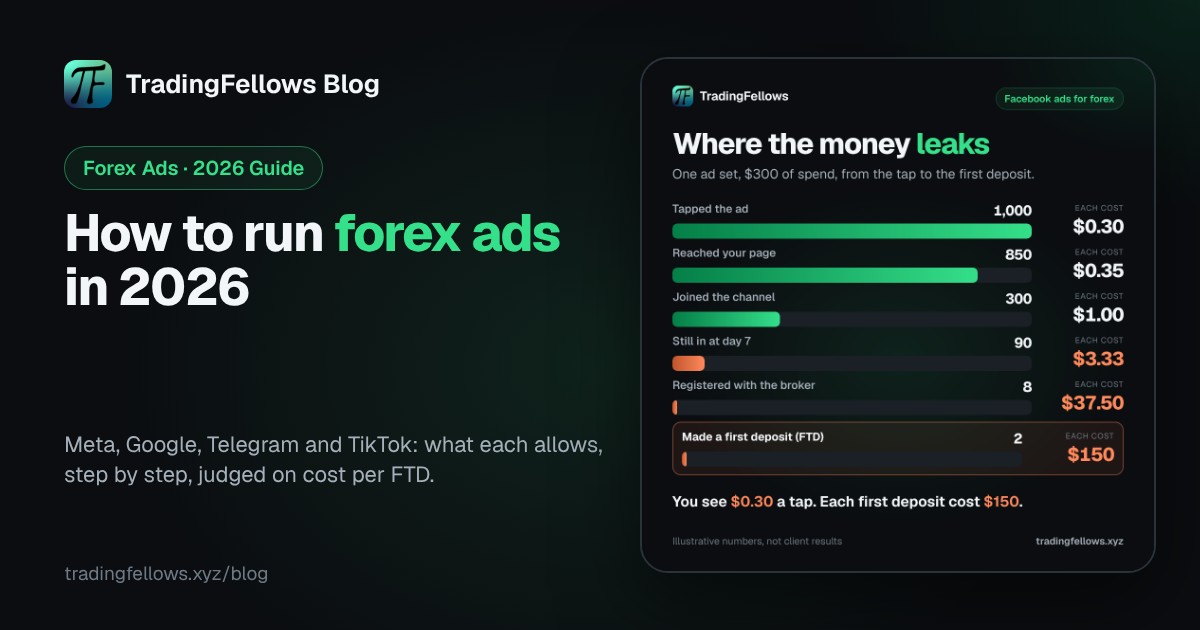
- Cost per FTD: your ad spend divided by the first-time deposits it brought.
- Postback: the call a broker or affiliate platform makes when a referred client registers or deposits.
Where can you run forex ads in 2026?#
You can run forex ads on Meta and Google under strict financial services rules, on Telegram Ads within its guidelines, and on TikTok only in some markets. Which one fits depends on your license, your target countries and whether you are the broker or a partner.
| Platform | Forex ads allowed? | Main condition | Best for |
|---|---|---|---|
| Meta (Facebook, Instagram) | Yes, under review | Financial services policy, regulator verification in some countries | Reach, testing offers, channels |
| Google Ads | Only in select countries | Licensed provider or aggregator, account approval, no signals pages | Search intent, brokers with a license |
| Telegram Ads | Yes, within guidelines | No get-rich-quick or guaranteed-return claims | People already reading trading channels |
| TikTok | Depends on the market | Licensed, 18+, and many markets do not allow forex at all | Only where the market allows it |
Meta: Facebook and Instagram#
Meta reviews forex ads under its financial products and services policy, and in a growing number of countries asks financial advertisers to prove regulator authorization before ads run. The UK (FCA) and Australia (ASIC) are two well-known examples. Meta is where most affiliates and IBs start, because it reaches people at scale and works well into a landing page and a Telegram channel. The full setup is in Facebook ads for forex brokers.
Google Ads#
Google treats CFDs, spread betting and rolling spot forex as complex speculative financial products. Under its financial products and services policy, ads are allowed only in eligible locations, only for licensed providers or aggregators, and only once the account is approved to run them. Pages that provide trading signals for these products are disapproved, and financial advertisers must show their business address and fees. For most affiliates without a license, Google search ads for forex are out of reach.
Telegram Ads#
Telegram's ad guidelines prohibit get-rich-quick offers, pyramid schemes and investments with a guaranteed return, and they require purchase terms to be clear. A promoted channel needs a complete description and a post from the last two weeks, and the ad's language should match the channel's. Telegram Ads reaches people who already read trading channels, which makes it a natural fit for forex. More in Telegram ads for forex.
TikTok#
TikTok's financial services ad policy changes by market. Several European markets, including the UK, the Netherlands and Austria, list high-risk investment products such as forex trading as not allowed, and many Latin American markets list forex services as not allowed. A few markets allow forex ads for licensed advertisers with an 18+ audience. Check your exact delivery market before you build anything for TikTok.
How to run forex ads, step by step#
These are the steps I follow, in order, for any forex campaign.
- Write the one-line offer. What the trader gets, in one sentence: the plan before London opens, a free webinar, a platform walkthrough. Every ad, page and welcome message repeats it.
- Check the countries. For each target country, check what each platform allows, whether advertiser verification is required, and whether your broker accepts clients from there.
- Pick one platform to start. Usually Meta for partners, Google for licensed brokers, Telegram Ads for channel growth. Prove one before adding a second.
- Build a page in front of the offer. One page with your pixel, the offer said once more, the risk warning your broker requires, and one button. Never send ads to a bare broker link or a bare t.me link.
- Give every ad set its own tracked link. For a Telegram channel, one invite link per ad set. For a broker sign-up, a tracked link per ad set and a link of their own for each person.
- Write creative inside the rules. No income claims, no win rates, no guarantees, no lifestyle shots. Sell the education, the plan or the platform.
- Send the results back. Get postbacks from the broker on registration and first deposit, and pass them to Meta through the Conversions API.
- Judge on cost per FTD, then scale. Read early signals such as who is still in your channel at day 7, then decide on cost per FTD.
- AdSomeone taps an ad in one of your ad sets.
- PageYour pixel records the visit and the ad set that sent it.
- Channel or sign-upThey join through that ad set's own link.
- WelcomeYour bot greets them and hands them a link of their own.
- BrokerThey register and fund through that link.
- PostbackThe broker reports the registration and the first deposit.
- MetaThe deposit goes back to Meta, so it looks for more depositors.
The ad set's name stays attached from the tap to the deposit.

How to run forex ads as an affiliate or IB#
Affiliates and IBs can run forex ads, but they carry two sets of rules: the platform's and the broker's. Read the broker's partner terms before your first ad.
- Brand names. Many brokers do not allow partners to run ads on the broker's brand name, or to bid on it in search.
- Countries. Clients from countries the broker does not accept are usually not paid.
- Your own page and channel. Promote your education, plan or community, then refer to the broker. That keeps the ad about what the trader gets.
- Postbacks. Ask for a postback on registration and first deposit before you spend. It is the only way to know which ad set made money.
- Signals. Google disapproves destinations that provide trading signals for forex and CFDs, so a signals channel is a Meta or Telegram play, not a Google one.
What can you say in forex ads?#
You can describe the product, the education and the platform. You cannot promise money. The same lines fail review on every platform.
| Write this | Not this |
|---|---|
| The gold plan we post before London opens | Make $500 a day trading gold |
| A free webinar on reading the economic calendar | Our signals win 90% of the time |
| Trade on MT5 with a regulated broker | Guaranteed profits |
| Three levels we watch every morning | Quit your job in 30 days |
| A demo account to practise first | A photo of a sports car and a P&L screenshot |
How much do forex ads cost?#
Forex ads cost more than most categories because the competition is high and the review is strict, but there is no reliable public benchmark for your campaign. Clicks, leads and deposits vary widely by country, platform and offer.
The useful number is not the cost per click. It is your cost per FTD compared with what an FTD pays you. Typical forex CPA payouts are often quoted from around $200 to over $1,000 per qualified FTD, depending on the country and the broker, according to Track360's CPA vs revenue share glossary. That payout is your ceiling: if your cost per FTD stays well below it, the campaign works.

Why forex ads get rejected#
- Promises. Income claims, win rates, guarantees and lifestyle images are the most common reason.
- The destination. A page that sells signals, hides fees, or does not match the ad.
- The advertiser. Missing regulator verification in a country that requires it.
- The account itself. A new account with no history, or a restricted personal profile behind it. If your profile was banned while your Business Manager still works, see personal Facebook account banned, Business Manager still active.
What is happening?
Remove income claims, win rates and lifestyle images, and check the page matches the ad.
Go to the fixGive every ad set its own link, get broker postbacks, and fix the welcome.
Read that guideCheck what was restricted, the profile, the ad account or the business, and appeal the right one.
Read that guideCheck what each platform allows in your countries first.
Go to the fixForex ads mistakes to avoid#
- Building creative before checking what the platform allows in your countries.
- Sending ads straight to a broker link or a bare t.me link.
- Running the same campaign in every country.
- Judging on cost per click or cost per lead.
- Running ads on the broker's brand without permission.
- Scaling before you can say which ad set brought the deposits.
Start with the rules, then the budget#
Running forex ads is mostly about order. Check what each platform allows in your countries, build a page in front of the offer, track every ad set to the deposit, and scale on cost per FTD.
If you want the ads, the page and the tracking in one place, see the Fellows Hub at tradingfellows.xyz. Questions go to the operator on Telegram: t.me/TradingFellowsAds.
Frequently Asked Questions
What are forex ads?
Can you run forex ads on Facebook?
Can you run forex ads on Google?
Can you run forex ads on TikTok?
Can forex affiliates run ads?
How much do forex ads cost?
Why do my forex ads keep getting rejected?
What is the best platform for forex ads?
Keep reading
High CTR No Conversions on Facebook Ads? The Complete 2026 Diagnosis
Your best-CTR ad set produced nothing, so you rewrote the page. If most billed clicks never became visits, non
Virtual Phone Number for Facebook: The Complete 2026 Business Manager Guide
The number that verified your Business Manager belongs to a stranger by spring. What Meta actually checks, why
Facebook Ads Payment Failed? The Complete 2026 Guide to Fixing It Fast
Either your bank refused the charge or Meta did, and the two need opposite responses. How to tell which in thr